FPGA AI Assistant Practical Guide for Frontline Engineers
Abstract: Between September and October 2026, AI assistants from three major FPGA vendors—AMD Ross, Altera QuartusIQ, and Lattice Prompt—were launched in concentrated succession within two months. From the perspective of frontline FPGA engineers, this article explains what these assistants actually are, how to choose among them, how to set up the environment, and the correct usage and red-line rules for three high-value scenarios: timing closure, HLS migration, and documentation lookup/constraint writing/debugging. A four-week onboarding roadmap is included.
Intended audience: FPGA engineers who use Vivado / Quartus / Radiant daily for RTL design, timing closure, and board-level debugging.
Information current as of 2026-11-02; product status is subject to the vendors' latest releases. One-sentence positioning: These AI assistants do not make design decisions for you, but they run workflows, look up documentation, tune timing, and try out solutions on your behalf—your value becomes concentrated in "judgment and decision-making."
First, get clear: What exactly is an AI assistant?
Before getting hands-on, use an architecture diagram to clarify the concepts. Currently, the assistant architectures of the three major international vendors (AMD, Altera, Lattice) are highly consistent:
AI client + LLM (Claude / GPT / DeepSeek / Kimi / Nemotron…, your choice)
Agent orchestration layer (plans multi-step tasks, decomposes your intent)
MCP Server (open protocol, connects AI to EDA tools)
EDA toolchain (Vivado / Quartus Prime Pro / Radiant)
Vendor knowledge base (RAG retrieval of official documentation) + Agent Skills (expert-experience-encapsulated workflows)
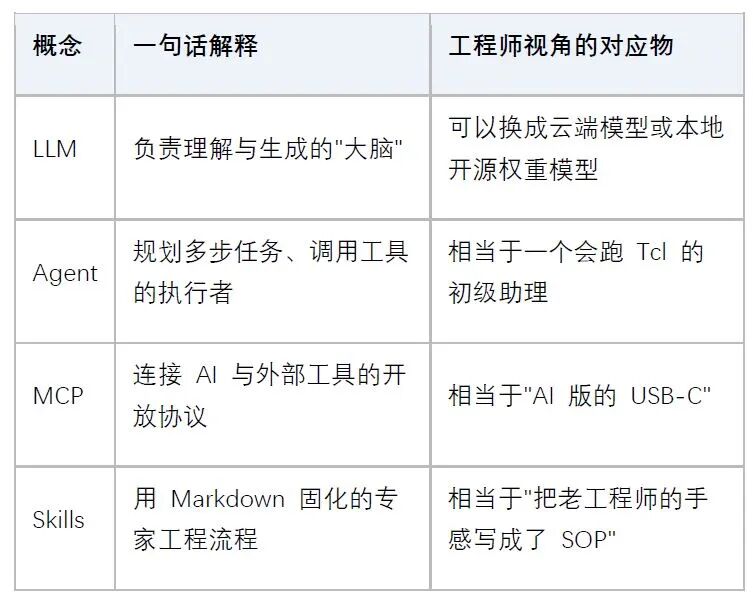
Important understanding: These assistants are not "AI designing chips by itself." They read reports, give suggestions, and automatically modify constraints and RTL, but all changes require your approval before execution (mandatory human approval gating). You are the decision-maker; AI is the executor.
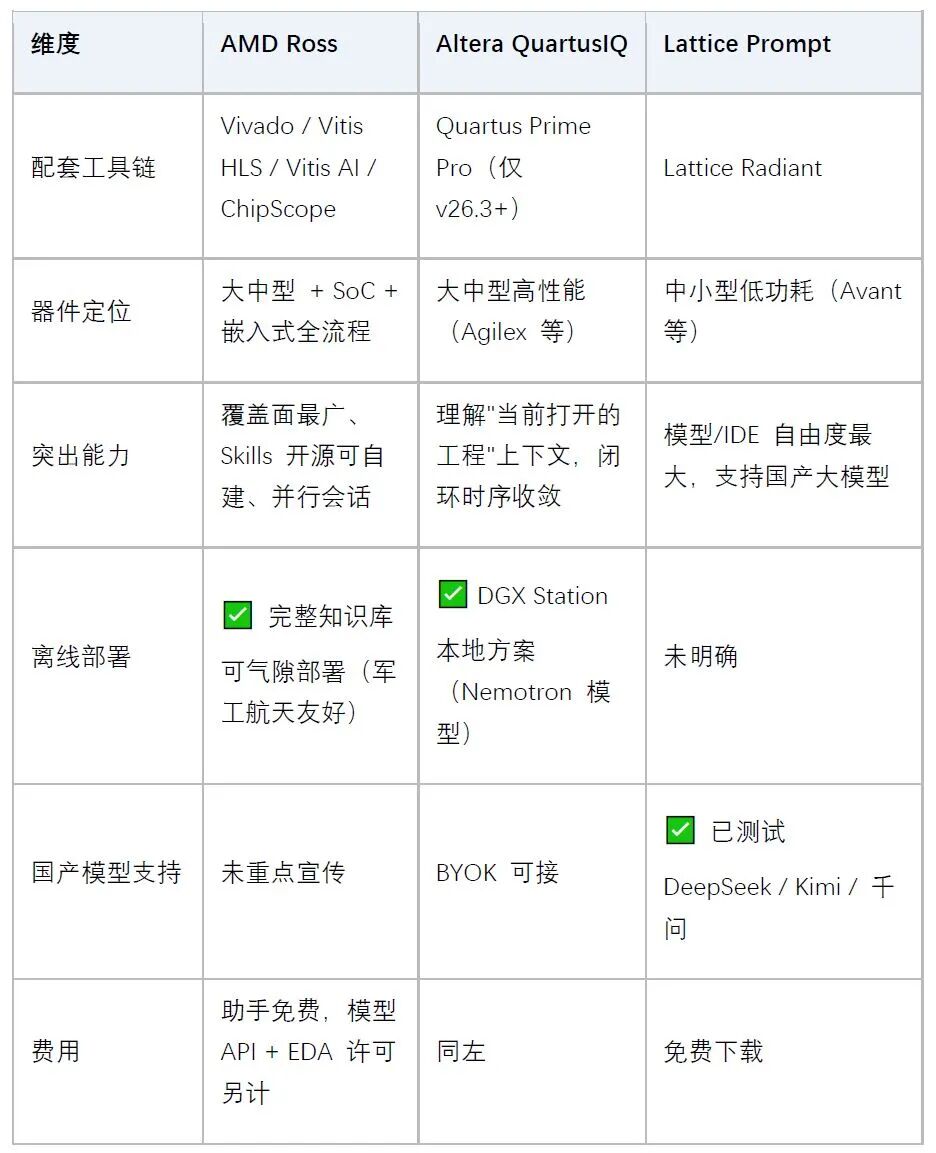
Classified projects, need to build enterprise knowledge accumulation → AMD Ross
Using large devices, want AI to understand your current project's constraints and timing reports → QuartusIQ (note: requires upgrade to Pro 26.3)
Small and medium devices, limited budget, want to use DeepSeek/Kimi → Lattice Prompt
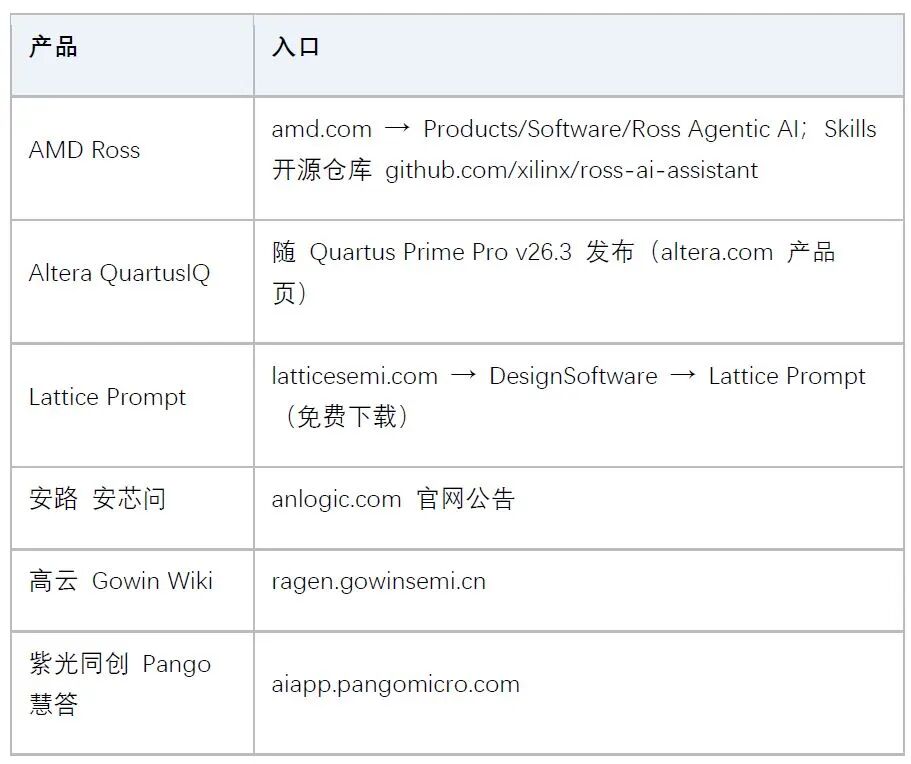
Using domestic FPGAs (Anlogic / Gowin / Pango) → currently only knowledge Q&A available (Anxinwen / Gowin Wiki / Pango Huidа); for full Agent workflows, keep an eye on third-party IC Coder
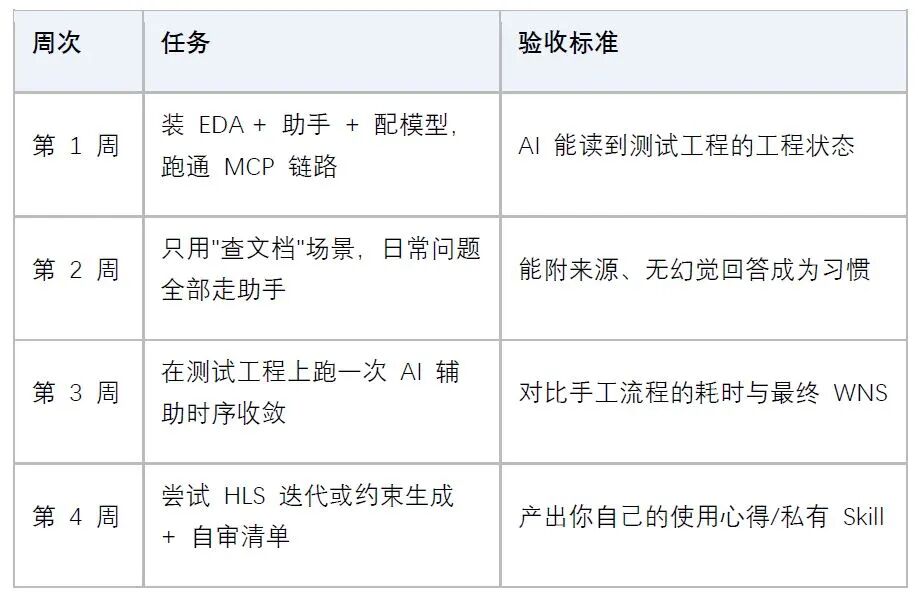
First step to get started: Environment setup (using the general three-step method as an example)
The installation methods of the three vendors are largely similar; Lattice Prompt is used as the simplest example:
Step 1: Install the EDA tool + the AI assistant itself
Confirm the EDA tool version meets requirements (e.g., Lattice Prompt requires the latest version of Radiant; QuartusIQ requires Prime Pro 26.3), and download the assistant from the vendor's official website (all are free downloads).
Step 2: Prepare LLM access
Cloud route: Configure the API Key of your chosen model in Cursor / VS Code / Claude Code.
Local route (classified teams): Prepare the inference environment—AMD requires a database + Embedding model + MCP Server; the Altera solution is optimized for NVIDIA DGX Station + Nemotron open weights.
Step 3: Connect MCP and verify the link
Register the vendor-provided MCP Server configuration in the AI client.
Verification method: Ask the AI to "query the device model of the current project" or "list the Vivado project status." If it can read real project information, the link is working.
⚠️ Pitfall avoidance: First run the full workflow on a non-classified test project before introducing it to formal projects. Letting AI touch your mass-production project constraint files for the first time is a major taboo.
This is the scenario with the hardest data among all assistant marketing claims, and the one most worth prioritizing for adoption.
Traditional: review report_timing_summary → manually classify hundreds of violating paths
→ try constraints → recompile → check WNS → loop until dawn...
You: "Current project WNS = -0.5ns, help me classify violating paths and provide a convergence plan"
AI: automatically classifies failing paths → identifies routing congestion / logic levels / fanout issues
→ suggests constraint adjustments or RTL pipeline changes → (you approve) → automatically iterates and reruns
Lattice: quantum error correction decoder 5ns violation, 200MHz target, root cause identified and converged in 4 hours (normally takes days)
AMD Ross: can autonomously iterate fixes until violations reach zero; supports parallel sessions (one session runs place-and-route while another continues working)
First have the AI read reports, classify, and propose solutions—don't start by having it modify files.
Review every constraint modification it suggests: indiscriminately adding false_path or multicycle_path creates over-constraining, and landmines will be buried at signoff.
For changes involving RTL structural modifications (inserting pipelines, replicating registers), you must return to simulation regression after the change—AI won't proactively add simulation for you.
Use vendor Skills to solidify timing methodology flows (such as AMD's timing methodology Skill)—more reliable than relying on memory to look up UG949.
High-value use case two: HLS / algorithm porting
More than half of AMD Skills are HLS-related—this is currently the highest-value area for AI assistants.
Typical case: porting CUDA's OCT reconstruction algorithm to Lattice Avant, completed in 30 hours (normally months); image demosaic pipeline reached throughput target in 2 hours with Vitis optimization skills, with 35% LUT reduction.
How to use: describe the source code and performance targets (throughput/latency/resource budget) to the AI → invoke HLS optimization Skills (e.g., /hls-optimize) to iterate on pragmas, dataflow, and line buffer schemes → review synthesis logs and simulation results each iteration. The LLM+RAG closed-loop framework achieves a 70% reduction in manual tuning precisely by "feeding synthesis logs back to the model."
Note: MATLAB → C++ conversion tasks have ready-made Skills, but numerical precision (fixed-point conversion) must be verified yourself—AI's judgment on rounding errors is unreliable.
High-value use case three: daily "document lookup + constraint writing + debugging"
This is the fastest-acting usage; recommend all engineers adopt it today: be precise in your questions, e.g., "In Vivado, should I use set_clock_groups -asynchronous or set_false_path in this cross-clock-domain scenario? Source clock 100MHz, destination clock 156.25MHz." The assistant's answers are grounded in the official documentation library (with sources attached), far more reliable than general-purpose LLMs fabricating APIs.
Provide pin tables, I/O standards, and Bank assignments, and let the AI generate XDC/SDC drafts;
Mandatory self-review: have it output an "over-constraint / missing-constraint self-check list"—this step cannot be skipped.
When board-level anomalies occur, describe the symptoms and ILA-captured waveforms to the AI, and have it help you bisect and locate using "signal not toggling / toggling but incorrect / correct but wrong at output";
AMD Ross roadmap has incorporated the ChipScope debug workflow, which can automatically insert debug cores and rerun the flow.
Red lines and rules: self-cultivation of FPGA engineers in the AI era
❌ Approving without review: AI's constraint modifications and RTL changes must be reviewed item by item before approval and execution.
❌ Skipping simulation: any RTL change must be followed by regression simulation at the corresponding level—signoff responsibility lies with you, not the AI.
❌ Uploading classified data to the cloud: For military/aerospace, automotive-grade, or pre-tapeout IP, use offline deployment solutions (AMD air-gapped, Altera DGX local), or simply don't use cloud-based assistants.
❌ Taking vendor marketing data as acceptance metrics: "10x efficiency" is a marketing claim that has not been independently audited; rely on your own project's measured results.
✅ Treat AI as a "junior assistant that can run Tcl": it executes, you decide.
✅ Make good use of Skills: prioritize invoking vendor-validated engineering workflows rather than asking the bare LLM directly.
✅ Team knowledge accumulation: Following AMD's open-source Skills model, codify your team's timing closure playbook and debug checklists into private Skills/documents to unify team engineering methodology.
✅ Maintain the habit of demanding supporting evidence: require AI to provide justification for changes (document references, report data), and reject "should be fine."
MCP (Model Context Protocol): An open protocol introduced by Anthropic in 2024 and donated to the Linux Foundation by the end of 2025, used for standard connections between AI agents and external tools/data.
RAG: Retrieval-Augmented Generation — retrieving relevant documents from a knowledge base before answering, to reduce hallucinations.
Agent Skill: Expert-authored structured engineering workflows packaged in formats such as Markdown, which AI can follow to execute tasks.
BYOK: Bring Your Own Key — users connect using their own model API Key.
Air-gapped deployment: Running entirely on a physically isolated internal network, with data never leaving the enterprise.
This article is compiled from public sources (vendor official websites, press releases, industry media). Efficiency data reflect vendor or customer case claims; actual benefits vary with engineering complexity. Tool versions iterate quickly (AMD updates monthly); please verify against the latest official documentation before use.