AMD Open-Sources AI Agent Assistant for FPGA and SoC Development
The following article is from Open FPGA, by Sui Sisi.
From code generation to synthesis optimization and ILA online debugging, AMD has open-sourced a set of AI Agent skills for FPGA and SoC development.
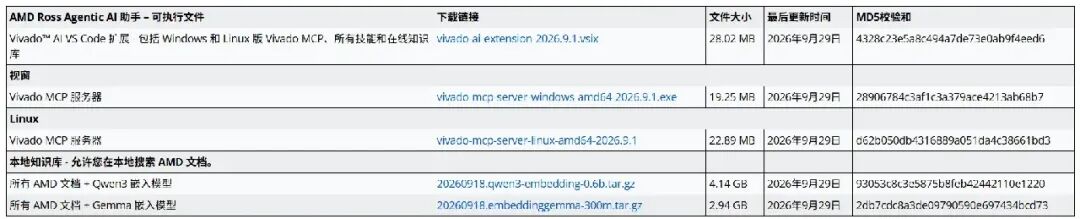
As large models gradually enter the hardware development field, AI-assisted Verilog coding and HLS code generation are no longer novel. However, the truly complex aspects of FPGA development often lie not in the code itself, but in the entire development workflow: RTL simulation, timing constraints, synthesis and implementation, resource optimization, board-level debugging, and coordination across various tools and technical documentation.
AMD's ROSS Agentic AI Assistant is precisely intended to extend AI applications from mere code assistance to practical FPGA and embedded development workflows.
This tool is not just a chatbot that can answer Vivado questions. Through open standards such as Agent Skills and MCP, it connects AI with Vivado, Vitis HLS, hardware debugging tools, and AMD technical documentation, enabling AI to invoke the appropriate tools and perform specific development operations based on the task.
The project is now open-sourced on GitHub and includes various skills for FPGA, HLS, hardware debugging, and Vitis AI, along with example projects and usage documentation.
GitHub: https://github.com/xilinx/ross-ai-assistant
https://www.amd.com/en/support/downloads/ross-agentic-ai.html
https://ross.amd.com/chat#setup
PS: You can skip this — it's all AI-written...
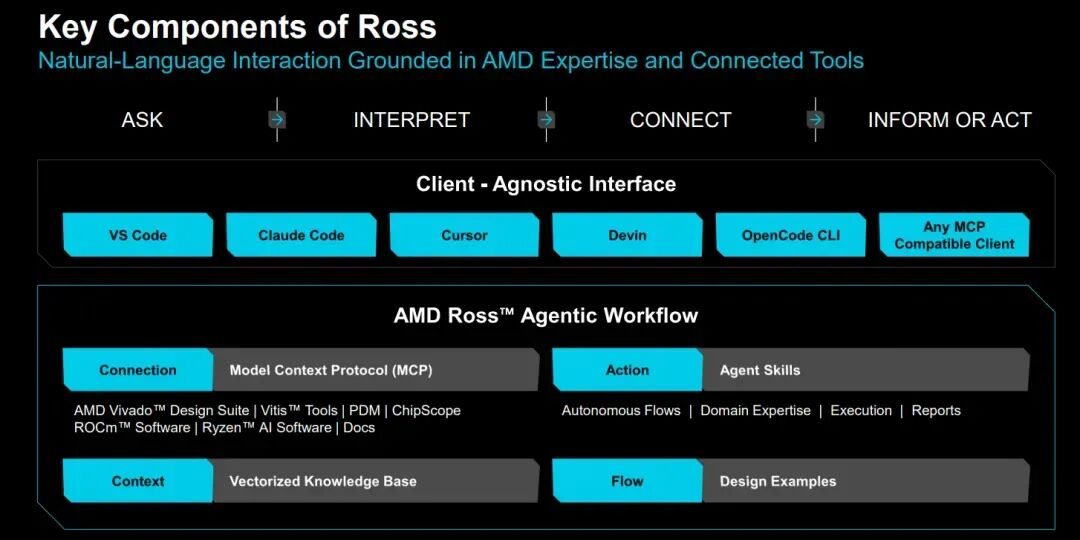
ROSS stands for AMD Ross Agentic AI Assistant. AMD positions it as an AI-client-agnostic Agentic AI assistant, primarily designed to accelerate multi-domain workflows in AMD's embedded development toolchain.
Simply put, ROSS aims to enable developers to describe design intent in natural language, with AI invoking tools, executing tasks, and connecting multiple stages of the development workflow.
Traditional AI programming assistants mainly focus on code generation and modification — for example, asking AI to write an AXI4-Lite register module or generate a simple HLS image processing function.
ROSS goes further in its application scenarios.
Suppose we are developing an FPGA image processing module and need to accomplish the following:
Generate HLS C++ code based on algorithm requirements.
Run C simulation and synthesis, and review resource utilization and performance reports.
Iteratively adjust the code based on target clock frequency and resource constraints.
Generate or check RTL and run simulation.
After deploying the design to the FPGA, capture signals via ILA to analyze actual hardware issues.
In a traditional workflow, these tasks involve multiple tools, different types of reports, and a significant amount of manual operation.
With ROSS, developers can propose tasks in natural language; AI invokes different skills based on the task, interacts with tools via the Vivado MCP Server, and then decides the next step based on results.
It should be noted that ROSS is not a tool that can automatically understand all FPGA designs and guarantee success on the first attempt. It provides a set of automation capabilities for specific development tasks, and the final design results still require engineer review and verification.
Core Technology: Agent Skills + MCP
To understand ROSS, one must first understand two key concepts: Agent Skills and MCP.
1. Agent Skills: Encapsulating FPGA development expertise into invocable skills
Agent Skills can be understood as a set of task-specific operating instructions, knowledge, and execution flows.
Unlike directly asking AI questions, skills tell the Agent:
For example, the hls-optimize skill in ROSS is primarily used for iterative optimization of HLS kernels.
Developers can provide information such as source code, target device, clock requirements, and resource constraints. The Agent then, based on skill definitions, invokes relevant auxiliary skills, executes the HLS compilation flow, extracts synthesis reports, and attempts to adjust the design based on the results.
The key here is that a skill is not just a prompt; it can also organize multiple task steps to form a relatively complete development workflow.
ROSS breaks down a large number of FPGA development tasks into independent skills, then invokes auxiliary skills through a main skill. This structure facilitates the reuse of development experience and makes future extension easier.
MCP: Enabling AI to Truly Connect to Vivado
MCP (Model Context Protocol) is an open protocol for connecting AI applications with external tools and data sources.
In ROSS, the role of MCP is to provide AI with an interface for interacting with development tools.
Among these, the Vivado MCP Server is a key component, primarily supporting:
Executing Vivado Tcl commands.
Interacting with Vivado hardware debugging features.
This means AI is no longer limited to analyzing code and logs pasted by developers; it can also directly invoke Vivado functions in an authorized and configured environment to obtain real tool execution results.
"Check for timing violations in the current project and analyze the critical paths."
With the support of the corresponding skills and tools, the Agent can invoke Vivado to obtain timing reports, then analyze based on the paths, delays, and logic structures in the reports.
MCP handles tool connectivity, and Agent Skills handle task workflows; together they form the core architecture of ROSS.
For the Vivado AI Assistant (MCP server):
Vivado 2026.1 is installed and PATH is set up.
AMD Vivado 2026.1 Learning Edition has been released and is available for download.
AMD Xilinx Vivado Installation Tutorial
One of the following options (cannot select both):
Vivado AI Assistant Extension VSIX — for IDE setup (VS Code / Cursor). This extension bundles the MCP server.
Vivado MCP Server binary — for CLI setup (Claude Code, Copilot CLI, Codex). Install to a directory such as ~/tools/.
An active Vivado session or design checkpoint (DCP) is available for use.
For the Vitis HLS AI Assistant (Agent Skills):
Vitis Unified IDE is installed and licensed — after sourcing settings64.sh, both v++ --version and vitis-run --version should work properly.
An AI client with the corresponding skills: VS Code, Cursor, Claude Code, Codex CLI, or GitHub Copilot CLI
(Optional) Vivado MCP server for obtaining AMD documentation-based answers via vivado_doc_search
Version compatibility: Tested versions are Vivado 2026.1 and Vitis 2026.1. The MCP server communicates with Vivado through its standard Tcl interface, so it is architecturally compatible with all released Vivado versions (2020.2 and above). Individual skills and examples note their respective minimum supported versions (see each skill's SKILL.md and each example's README.md).
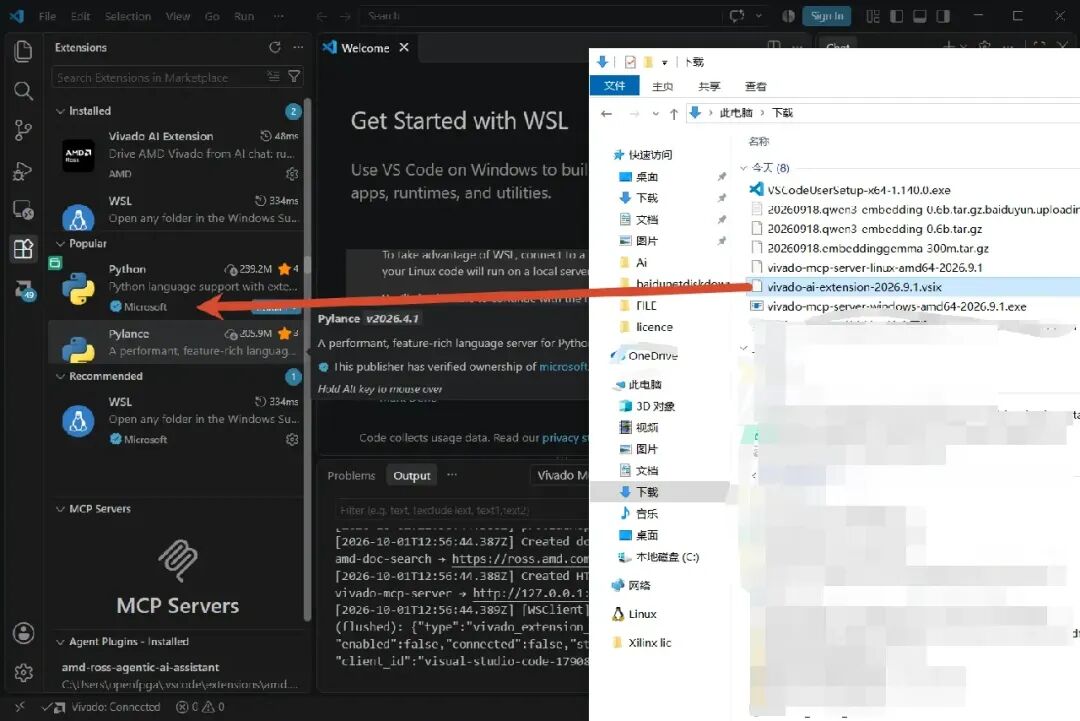
This time we are using the VS Code extension. Open VS Code and install the extension:
Go to the "Extensions" sidebar > click "..." > "Install from VSIX..." (or simply drag the extension over).
# VS Code code --install-extension vivado-ai-extension- .vsix # Cursor cursor --install-extension vivado-ai-extension- .vsix
After installing the extension, set the path to the Vivado executable:
Enter the full path to the Vivado binary (for example, /tools/Xilinx/Vivado/2026.1/bin/vivado).
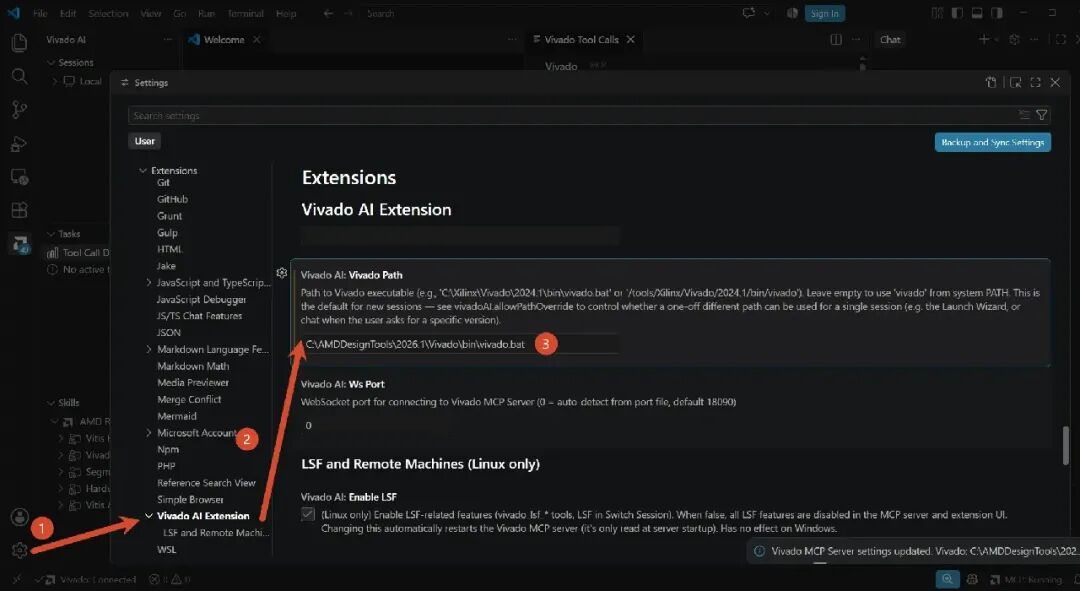
If Vivado PATH is already installed on the system, this step is optional—the extension will detect it automatically. However, explicitly setting the path can avoid problems when multiple versions are installed.
Next, you can invoke it through the AI tools on your own computer. You can call it directly using the model in VS Code, or you can call it directly using your own software. Here I use WorkBuddy to invoke it:

PS: Just give the AI the installation package and let it install and configure itself. The above is a bit complicated.
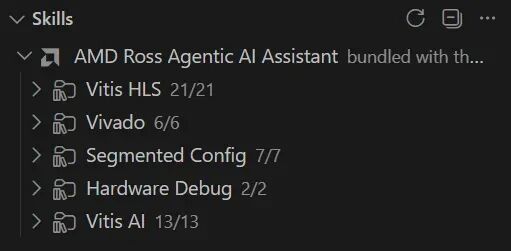
The Vitis part provides many HLS-related skills, which is an important part of Xilinx's AI promotion. It is also right to put more effort into this area.
The Vivado part provides skills related to IP configuration, version control, RTL lint, parsing, simulation, and methodology checks.
The focus is still on the ILA and VIO skills, which makes it convenient for AI to invoke online debugging.
For scenarios where you do not want to use the online documentation search service, AMD also provides a local knowledge base solution.
The official page provides a download package containing AMD documentation and embedding models, including versions based on Qwen3 Embedding 0.6B and EmbeddingGemma 300M.
The main purpose of the local knowledge base is to let document retrieval run in a local environment and reduce dependence on the hosted document search service.
Note that the local knowledge base mainly solves the document retrieval problem; it does not mean that the entire AI model inference, MCP services, and Vivado toolchain automatically become a fully offline environment. In actual deployment, you still need to separately confirm the AI client's model connection and data transmission method.
Judging from the currently public skill system, the focus of ROSS is not to replace Vivado, Vitis HLS, or FPGA engineers, but to bring AI into more practical operations in the development toolchain.
In the past, AI-assisted FPGA development mainly focused on code generation and technical Q&A.
Now, with the introduction of MCP and Agent Skills, AI can further participate in:
This allows AI-assisted development to gradually extend from "giving suggestions" to "invoking tools to execute tasks, and then adjusting the plan based on the results."
For engineers who want to try AI-assisted hardware development, they can start with a simple HLS optimization task or an RTL simulation diagnosis task, gradually become familiar with how ROSS invokes skills, and then expand to real engineering and board-level debugging scenarios.
File shared via cloud drive: 2026.0901 Link: https://pan.baidu.com/s/1YXQ_jB9j1vejOOg9jd5Q 4g Extraction code: open
Original title: AI does the grunt work for you! AMD open-sources FPGA development assistant
Reading insights on Chapters 1-2 of "AI Agent Application and Project Practice"—Understanding Agent frameworks and applications of the Coze platform
Reading experience of "AI Agent Application and Project Practice"—Learning Agent with Dige
"AI Agent Application and Project Practice"—Learning how to develop video applications