40 Common Pitfalls for FPGA Beginners: From Verilog to Board Bring-Up
When you first start learning FPGA, many people have an illusion: as long as you learn Verilog and get familiar with Vivado or Quartus, you've basically got the hang of FPGA.
It's only after doing a few real projects that you realize it's not that simple.
Code that synthesizes doesn't mean the logic is sound; simulation that runs doesn't mean it will work on the board; and waveforms that look fine don't mean timing will converge.
What's more troublesome is that many FPGA pitfalls are simply invisible at first.
For example, an incomplete if statement causes the synthesizer to infer a Latch; a signal crossing clock domains connected directly may simulate perfectly but start "randomly acting up" on the board; and casually building a divided clock from logic to lower frequency ends up throwing the entire design's timing constraints into chaos.
So what FPGA beginners really need to master isn't just 40 knowledge points—it's the engineering thinking behind those 40 knowledge points.
The 40 pitfalls below basically cover the entire journey from digital circuits and Verilog, to simulation, timing, and FPGA architecture, all the way to actual board development.
Part 1: It's Easy to Crash at the First Hurdle—Weak Digital Circuit Fundamentals
Many people aren't willing to spend time learning digital circuits.
"I'm just here to write Verilog. Logic gates and that stuff can wait."
Verilog is just a language for describing hardware. If you don't know what circuit the thing you're describing will ultimately become, you'll be completely in the dark when problems arise later.
In FPGA engineering, hexadecimal is something you see almost every day.
Register address: 0x80000000
Status register: 0x00000003
If you still need a calculator to convert between binary and hexadecimal, your debugging efficiency will be very low.
At minimum, you should be proficient in: binary, hexadecimal, decimal.
Additionally, you should understand what BCD code is about, especially when doing designs like displays and timers.
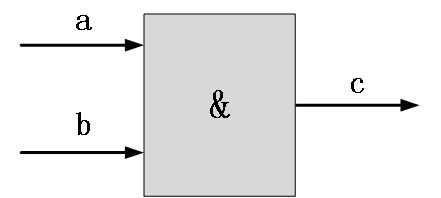
Pitfall 2: Knowing only AND/OR/NOT but not what XOR actually does
AND, OR, NOT are the most fundamental.
For example, parity checking, CRC, comparison logic, and adders all make heavy use of XOR.
When you see: assign y = a ^ b;
You should immediately think: what logic resource will this ultimately become?
Pitfall 3: Not being clear about combinational logic vs. sequential logic
Combinational logic: inputs change, outputs follow.
Sequential logic: relies on clocks and registers to hold state.
assign y = a & b;
always @(posedge clk)
A simple and blunt way to remember: combinational logic computes, registers remember.
Later topics like FSM, Pipeline, and FIFO can all essentially be traced back from here.
Pitfall 4: Not knowing what a MUX is when you see one
B ─┼──→ MUX ──→ Y
assign y = sel ? a : b;
In complex datapaths, there will be a lot of MUXes.
So don't underestimate this thing. Many times, when FPGA frequency won't go up, the problem is hidden in a pile of selection logic.
Pitfall 5: Treating Latch and Flip-Flop as the same thing
Flip-Flop is edge-triggered.
What beginners really stumble on is—you may not have intended to write a Latch, but the synthesizer inferred one for you.
always @(*) begin
First check whether your combinational logic has incomplete assignments.
Pitfall 6: Only knowing how to write + for adders, without understanding the hardware behind it
You write: assign sum = a + b;
But you need to know that the FPGA isn't executing an "add instruction."
The synthesis tool maps it to dedicated resources like carry chains inside the chip.
After understanding half adders and full adders, understanding resources like Carry Chain and DSP will be much smoother.
Part 2: The Most Common Verilog Misconception—Treating It as C Language
Verilog looks like it has variables, if, case, always—it really does resemble a software language.
But it describes hardware parallel behavior.
Pitfall 7: Confusion about module and port concepts
module led_ctrl(
input wire clk,
input wire rst_n,
output wire led
Here, module can be understood as a hardware module.
It's not a function, nor is it a parameter list in software.
Pitfall 8: Assuming reg always means a register
Although a here is declared as reg, after synthesis it may very well be just combinational logic.
What really determines whether something is a register is not the `reg` keyword, but: what hardware structure your RTL code describes.
Their values may look the same, but their bit widths are not the same.
assign c = a + b;
How exactly does this operation extend? Are there signed-bit issues?
In large projects, bit-width errors are a very common source of bugs.
Pitfall 10: Not knowing how to use buses, bit selects, and part-selects
wire [7:0] data;
Once you actually work on projects, you'll find that register mapping, protocol parsing, and data concatenation are things you do every day.
Pitfall 11: Mixing the three Verilog description styles together
The three common Verilog description styles: structural description
You only need to know: am I now describing wiring, combinational logic, or a sequential process? Having this judgment in your head while writing code is already enough.
Pitfall 12: Using blocking and non-blocking assignments indiscriminately
This is a pitfall every Verilog beginner steps into.
always @(posedge clk) begin
The two registers will complete the data exchange on the same clock edge.
One engineering habit: prioritize sequential logic.
Pitfall 13: Writing the always sensitivity list incorrectly
If it's SystemVerilog, you can further use:
The value of these styles is that they make code intent clearer and easier for tools to check.
It should be noted that if conditions in combinational logic do not cover all cases, it is very easy to infer a latch.
So after writing an if, don't forget to ask:
In every case, does this output actually have a definite value?
Three: If you can't simulate, going to the board is just "taking a chance"
Pitfall 15: Not knowing how to write a testbench